Array List
The Array List module draws a list of currently enabled modules on screen, with extensive visual customization options.
Array List
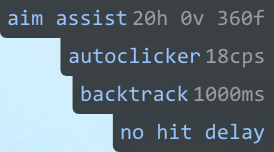
Layout
- Position — Where on the screen the list is anchored.
- Sort By Length — Sorts the list by rendered text width instead of the default order.
- Lowercase — Forces all module names to lowercase.
- Only Bound Modules — Only shows modules that have a key bind assigned.
- Spacing — Adds extra vertical spacing between items.
Text Styling
- Text Color — Main color of module names.
- Parameters — Shows additional parameter text next to module names where applicable (e.g. CPS value for AutoClicker).
- Parameter Color — Color of the parameter text.
- Scale — Multiplier for text size.
- Font Mode — Selects which font to use.
Gradient
- Gradient — Gradient direction (
Off,Left-Right,Top-Down). - Gradient Color 1 — Start color of the gradient.
- Gradient Color 2 — End color of the gradient.
Background
- Background — Toggles the list background panel.
- Background Options:
Rounded— Rounds the corners of the background.Blurred— Applies a blur effect behind the background.Shadow— Draws a shadow behind the background.
Accents
- Corner Line — Draws a colored accent line along the side of the list.
- Corner Line Color — Color of the accent line.
- Glow — Enables a glow effect behind each line of text.
- Glow Color — Color of the glow effect.
Filtering
- Disabled for — Hides modules from selected categories (
Combat,Visuals,Movement,Misc).